
1. Club Starts and Appearances
In ContingencyAI, "Appearances" are highly customizable because football contracts are rarely as simple as "any game played." The system provides significant flexibility to ensure the digital "Ruleset" matches exactly the legal wording of a transfer agreement.
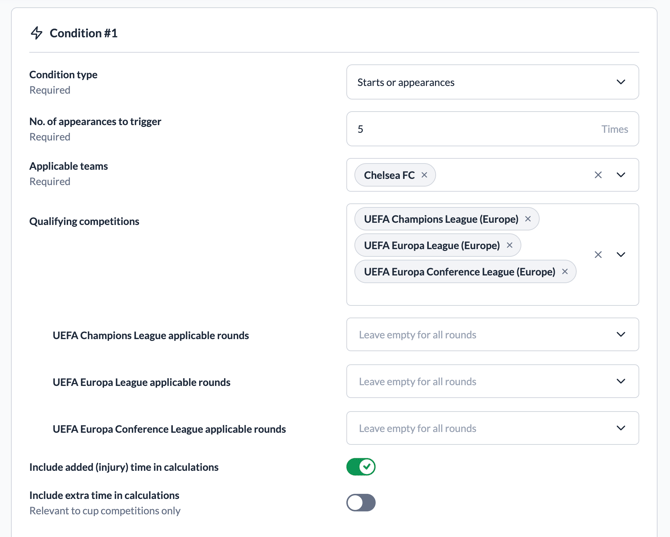
1.1. Global Clause Settings
These settings define the high-level boundaries of the clause, regardless of the specific performance conditions.
-
Title & Notes: Optional fields to identify the clause (e.g., "First Team Debut Bonus") and provide internal context.
-
Covers Season(s): A multiselect field allowing you to restrict the clause to specific years.
-
Note: If left empty, the system automatically tracks the player for the entire duration of the transfer agreement.
-
-
Recurring Max Times: Defines how many times this specific payout can be triggered. If left blank, the trigger is unlimited.
1.2. Appearances Definitions
A. Defining "What Counts" as an Appearance
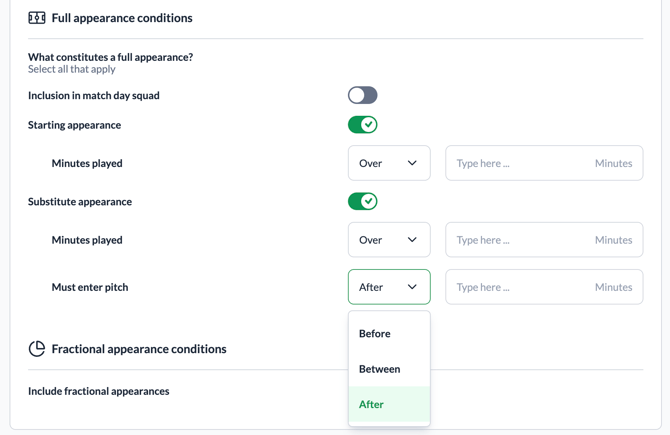
An user isn't stuck with a one-size-fits-all definition. They can define a valid appearance based on:
-
Match Day Squad: Simply being on the bench counts.
-
Starting Lineup (Starts): The system can track specifically if a player was in the "Starting XI" at kickoff.
-
Total Minutes Played in a match: A club can set a threshold. For example, a game might only count as an "appearance" if the player is on the pitch for at least 45 minutes.
-
Substitute Appearances: Users can choose to include or exclude games where the player came off the bench, with an extra level of granularity: at what minute did the player enter the pitch (before/after/between).
- Competition (including Rounds): Clubs often use this to reward players for performing in high-pressure matches.
- Clause: "Pay £50,000 if the player appears in the Champions League Final."
- Setup: The user selects "Champions League" as the competition and "Final" as the only competition round. Appearances in the group stages or earlier knockout rounds will not trigger the payment.
B. Defining a Fractional Appearance
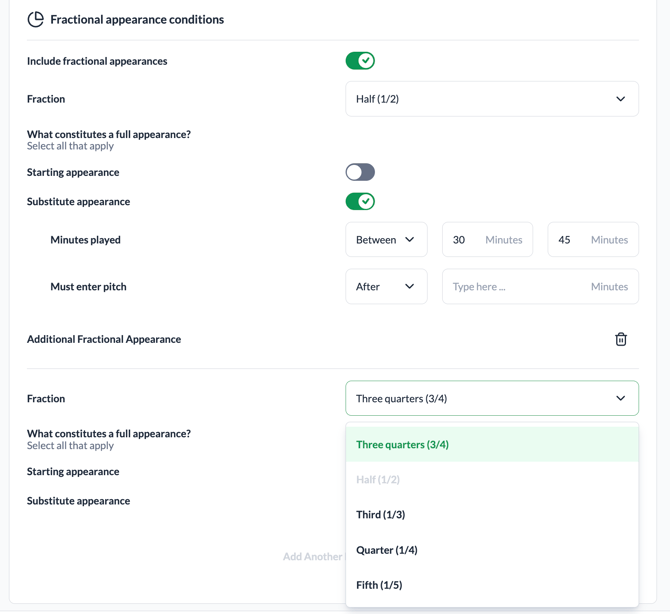
Some complex contracts use "weighted" appearances. Example: A contract might state that "2 substitute appearances count as 1 full appearance."
-
Flexibility: The system allows users to define these "fractions," automatically doing the math so that when the player makes their second sub appearance, the "Appearance Count" increases by 1.
-
Fraction Selection: Choose from values like 3/4, 1/2, 1/3, 1/4, or 1/5.
-
Specific Logic: You can apply different minute requirements for a 1/2 appearance versus a "Full" appearance.
-
Stacking: Use the "Add Another Fractional Appearance" button to create multiple tiers of partial credit within a single clause.
1.3. Handling "Added Time" and "Extra Time"
Contracts often argue over whether the "90 minutes" includes the time the referee adds at the end of a half. The user has the flexibility to:
-
Include/Exclude Added Time: Toggle whether the extra 3-5 minutes of "stoppage time" counts toward the player's total minutes for that game.
-
Include/Exclude Extra Time: Define if the 30 minutes played in knockout tournaments (like the FA Cup or Champions League) counts toward the milestone.
1.4. Adjustments for Availability (Injury Protection)
One of the most powerful flexible features is the "Only Games Player Available" logic.
-
The Problem: A club might owe a bonus if a player plays 50% of games in a season. But if the player is hit by a long-term injury, that 50% target becomes impossible.
-
The Solution: Users can set the system to ignore games where the player was physically unable to play (due to injury or suspension). This automatically adjusts the milestone target so the contract remains fair to both clubs.
1.5. Trigger Logic
Core Triggering Logic: The user defines how many appearances are needed and where they must happen.
-
No. of Appearances to Trigger: The required number of matches the player must participate in to activate the payout.
-
Trigger Frequency:
-
Once per season: Resets every season.
-
Multiple times per season: Can trigger repeatedly within one season.
-
Once across all seasons: A one-time career milestone at the club.
-
Multiple times across all seasons: Continuous tracking over the whole contract.
-
1.6. Payouts & Pro-rata
Once the conditions are met, the system handles the financial output.
-
Payout Amount: The currency is inherited from the base contract (e.g., EUR).
-
Distribute Payout Pro-rata: If this is toggled ON, the system will divide the total payout by the number of qualifying events.
-
Example: If a player is owed €100,000 for 10 appearances but only makes 5 before being sold, the system calculates a €50,000 adjusted payout.
-
2. International Starts and Appearances
International appearances, which represent a player's matches for their national team, are handled as a specific condition type in ContingencyAI. These include competitive matches and friendlies, but exclude club-level matches.
In the system, they are set up by selecting "International Starts or Appearances" when adding a condition, where users can then specify the required number of appearances or starts and, optionally, filter for specific international competitions like the World Cup or Euros.
2.1. How to Set Them Up
In ContingencyAI, these are treated as a separate category because they rely on a different set of data (National Team matches) compared to standard appearances.
To set up an international appearance trigger, the user follows these steps:
-
Select Condition Type: When adding a new clause to a Ruleset, choose either:
-
International Starts or Appearances: Provides the flexibility to distinguish between games where the player was in the starting XI versus coming on as a sub in the matches the player steps onto the pitch for their country.
-
-
Define the Milestone: Enter the required number (e.g., "Trigger payment after 10 international appearances").
-
Filter by Competition (Optional):
-
By default, the system tracks all "A-level" international matches.
-
Users can specifically filter for major tournaments (e.g., World Cup, Euros, Copa América) if the bonus only applies to "competitive" matches rather than friendlies.
-
-
Include/Exclude injury time and extra time in calculations.
-
Squad Filtering: In some cases, a contract might specify appearances for a specific national squad (e.g., "England Senior Team" vs. "England U-21"). The system allows you to select the specific national squad that should be monitored.
2.2. The list of competitions
For international appearance clauses, the list of competitions available is determined by a specific set of rules in the ContingencyAI database—the system filters the global database to only show relevant tournaments.
Here is how the system decides what to include:
-
Competition Type: Only competitions explicitly marked as "International" in the database are shown. This excludes club-level tournaments like the Premier League or Champions League.
-
Male Competitions: Currently, the system filters for Male-only competitions.
-
Category: It filters out unofficial tournaments so they don't clutter the selection list.
3. Appearance in % of Matches
Appearance in % of matches in ContingencyAI is a dynamic condition that evaluates a player's involvement relative to the club's total schedule. Unlike fixed appearance milestones (e.g., "50 games"), these clauses ensure that a player remains a consistent part of the team regardless of the season's length.
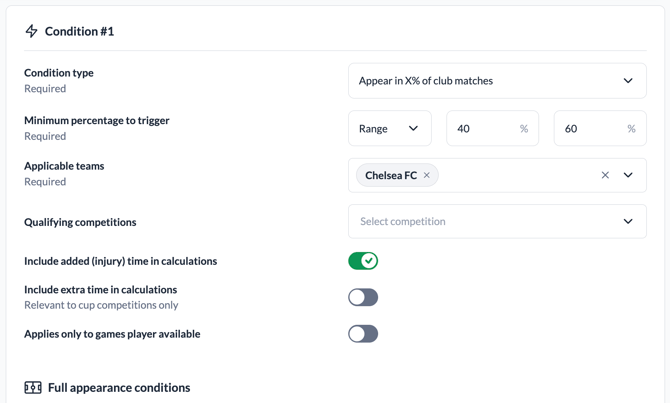
3.1. How the Calculation Works
The system determines the percentage by comparing two numbers:
-
The Player's Appearances: Matches where the player met the defined appearance criteria (e.g., played at least 45 minutes).
-
The Club's Total Matches: All matches played by the club during the specified season or period in the selected competitions.
The Formula:
(Player's Qualifying Matches / Club's Total Matches) * 100
3.2. Filters and Definitions
Just like fixed appearances, you can customize what qualifies as a "match" for both the player and the club:
-
Competition Selection: You can specify that the percentage only applies to League matches, ignoring Cup or International games.
- Competition Rounds:
- Rounds also work with percentage-based clauses. Example: "Player must play 50% of matches in the Knockout Stages (Round of 16 onwards) of the World Cup."
- The system will only calculate the "Club's Total Matches" and "Player's Appearances" within those specific knockout rounds, ignoring the group stage matches entirely.
-
Minimum Minutes: Define how many minutes a player must be on the pitch for a match to count toward their percentage (e.g., "Must play at least 60% of matches where he featured for 45+ minutes").
-
Minimum Percentage to Trigger: A required field where the user enters a value between 0% and 100%.
-
Single vs. Range Logic: * Single: The clause triggers only when the actual percentage matches the exact value entered.
-
Range: Users can define a "From" (minimum) and "To" (maximum) interval (e.g., 30%–50%). The range allows an input of 0 to cover "less than" scenarios.
-
-
Added/Extra Time: Choose whether the minutes calculation includes stoppage time or extra time in knockout rounds.
3.3. Key Flexibility: "Only Games Player Available"
This is the most critical setting for percentage-based clauses.
-
If Disabled (Default): If a club plays 40 games and the player is injured for 20 of them, their maximum possible percentage is 50%. This often makes triggering the clause impossible.
-
If Enabled: The system ignores games where the player was unavailable due to injury or suspension.
-
Example: Club plays 40 games, but the player was injured for 10. The system now only looks at the 30 games where the player could have played. If they played 15 of those 30, their percentage is 50%, even though they only played 15 games total.
-
3.4. Triggering Logic and Timing
The system does not necessarily wait until the very last game of the season to trigger a percentage clause. It triggers as soon as the player hits the required threshold and it's impossible for them to drop below it based on the remaining games.
-
Continuous Monitoring: Every time a match is played and data is updated, the system recalculates the player's current percentage.
-
The Trigger Moment: If a player needs to play in 75% of 40 games (30 games), the clause will trigger the moment they step onto the pitch for their 30th qualifying match, even if there are still 5 games left in the season.
-
Season-End Trigger: If the player only hits the required percentage in the final game, the trigger event is generated then.
3.5. How Percentage Ranges Work
Some complex contracts use Ranges (also called "Sliding Scales") instead of a single flat percentage. This allows for different payout amounts depending on how much the player actually played.
Example of a Range-Based Clause:
-
50% - 60% appearances: Pay £100,000
-
61% - 75% appearances: Pay £200,000
-
76%+ appearances: Pay £300,000
Percentage-based clauses follow specific timing rules to ensure data accuracy before a payout is confirmed. % based clauses can only trigger: Once per season.
If a clause defines multiple payment bands (e.g., 50%–60% = €50k, 61%–70% = €100k), only the highest band reached will trigger a payout. If a player reaches 65%, the €100k fee triggers, and the lower band is ignored.
4. Participation in % of minutes
The "Participation in % of minutes" clause is a more granular performance metric than "% of matches." While a "% of matches" clause only cares if a player stepped onto the pitch, this clause tracks every single minute played relative to the total possible playing time.
4.1. How the Calculation Works
The system calculates this by comparing:
-
The Player's Actual Minutes: The total sum of minutes the player was on the pitch across all qualifying matches.
-
Total Possible Minutes: The total duration of all matches played by the club in the selected competitions (e.g., 90 minutes multiplied by the number of matches).
The Formula:
(Total Minutes Player was on Pitch / Total Minutes Club has Played) * 100
4.2. Key Customization Options
Because minute-tracking can be complex (e.g., when does a match actually "end"?), the system provides several toggles to match the contract's wording:
-
Include Added Time:
-
Off (Default): The system treats every standard match as exactly 90 minutes.
-
On: The system includes "stoppage time" (e.g., if a player plays 90 + 5 minutes of injury time, they are credited with 95 minutes).
-
-
Include Extra Time:
-
On/Off: Specifies whether the 30 minutes of extra time in knockout cup games should be added to the total possible minutes.
-
-
-
This is crucial. If the player is injured, those matches (and their 90+ minutes) are removed from the "Total Possible Minutes" calculation, so the player isn't penalized for time they physically couldn't play.
Only Games Player Available:
-
4.3. Difference from "% of Matches"
-
% of Matches: A player who comes on as a sub in the 89th minute (depending on how the clause is set up) can get credit for "1 match played."
-
% of Minutes: That same player only gets credit for 1 minute out of a possible 90.
This makes the "% of minutes" clause a much harder threshold to reach and is typically used to ensure the player is a core, "ever-present" part of the team.
4.4. Triggering and Ranges
-
Trigger Moment: Like match percentages, the system triggers the payment the moment the player’s total accumulated minutes reach the required percentage of the total season’s possible minutes.
-
Ranges: Users can set up "tiers" (e.g., "50% of minutes = £100k", "75% of minutes = £200k"). The system automatically identifies when the player crosses from one tier to the next.
5. Goals (± Assists)
In ContingencyAI, "Goals" and "Goals and Assists" are performance-based triggers that track a player's direct impact on the pitch.
5.1. Scored Goals Clauses
This clause monitors the total number of goals a player scores for their new club.
-
How it works: Every time the player scores in a qualifying match, the system increments their total count.
-
Triggering: The payment is triggered the moment the player reaches the specified milestone (e.g., "Pay £100k when the player scores 10 goals").
-
Filtering: You can specify that only League goals count, excluding Cup or Continental competitions.
5.2. Goals and Assists Clauses
This is a combined metric often used for attacking players.
-
How it works: The system sums both Goals and Assists into a single "Points" total.
-
Example: A player with 7 goals and 3 assists has 10 Goal Involvements.
-
-
Data Accuracy: The system uses verified external data providers to track assists, ensuring there is no ambiguity about what counts as a "valid" assist (following professional league standards).
-
Triggering: Like goals, the payment triggers as soon as the combined total hits the milestone.
5.3. Recurrence Settings (The Four Logic Types)
The system uses four distinct business scenarios:
| Logic Type | Logic Settings | Example Scenario | Behavior |
| Once across all seasons |
Recurring: OFF Season Isolated: OFF |
"Pay £500k when the player scores his 50th goal for the club." | The counter never resets. Once the 50th goal is reached, the payment triggers once, and the clause is fulfilled forever. |
| Once per season |
Recurring: OFF Season Isolated: ON |
"Pay £50k if the player scores 15 goals in a single season." | The counter resets to zero at the start of every season. The player can trigger this payment once every year if they hit the 15-goal target. |
| Multiple times across all seasons |
Recurring: ON Season Isolated: OFF |
"Pay £10k for every 5 goals the player scores total." | The counter never resets. Payouts trigger at 5, 10, 15, 20 goals, and so on, until the Max Occurrences limit is reached. |
| Multiple times per season |
Recurring: ON Season Isolated: ON |
"Pay £5k for every 5 goals scored in a single season." | The player gets paid at 5, 10, and 15 goals within a season. At the start of the next season, the counter resets to zero. |
5.4. Competitions and Competition Rounds
You can restrict which goals and assists "count" toward these milestones by applying filters:
-
Competitions:
-
Users can select specific leagues or cups (e.g., "Premier League goals only").
-
If a player scores in the Champions League but the clause is only for "Domestic League," the system will automatically ignore those goals.
-
-
Competition Rounds:
-
This provides granular control over the stage of a tournament.
-
Example: A contract might specify that a bonus is only for "Goals scored in the Knockout Stages" of a cup.
-
Behavior: The system will ignore goals scored in the Group Stage and only begin counting once the player scores in the Round of 16, Quarter-finals, etc.
-
5.5. How the "Trigger Date" is Decided
For both clauses, the Trigger Date of the payment is the date of the match in which the player hit the milestone.
-
Example: If a player starts a match with 19 goals and scores in the 34th minute of a game on November 12th, the system will identify that the 20th goal was reached and set the trigger date to November 12th.