
Player Data Manager
The Player Data Manager (PDM) is your central hub for viewing and editing all Transfers Out, Transfers In, and Player Salary contracts in one place. You can also upload new contracts directly from this page.
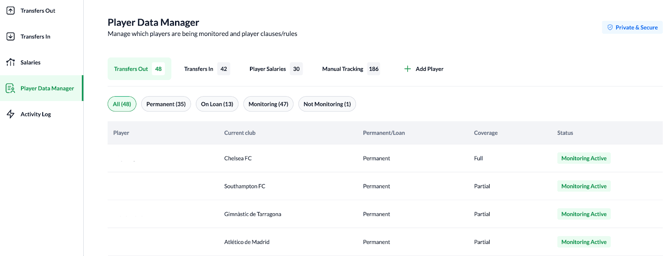
1. Manual Tracking
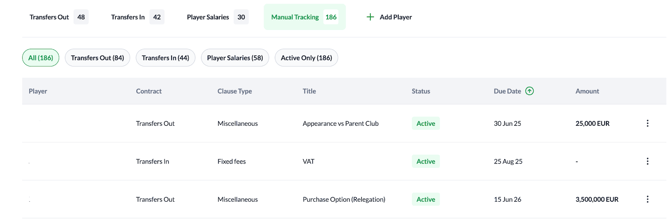
The Manual Tracking section is a dedicated tab within the PDM designed to manage clauses that do not fall under the standard automated categories. This section ensures that unique obligations—such as those requiring manual verification or those based on private data—are accurately recorded and accounted for.
How it Works
-
Quick Filters: Sort clauses by contract type (Transfers Out, Transfers In, Player Salaries) or view Active Only items to see what is currently outstanding.
-
Smart Sorting: To help you prioritize the most valuable or time-sensitive clauses, you can sort the table by Player, Due Date, or Amount.
-
Manual Actions: Use the "three dots" menu to select Manually Trigger when a condition is met, or click any row to open the full Player Pop-up.
2. Activity Log
The Activity Log is a centralized audit trail that provides transparency into every action taken within the platform, ensuring full accountability for contract management.

All entries are recorded with precise GMT timestamps and identify the specific user or system process that performed the action.
-
User Activity: Monitor when specific team members log in or edit active contracts.
-
Trigger Events: The log automatically records every instance when a performance or club milestone is reached.
-
Billing Updates: Every status change for an invoice—such as marking a clause as "Invoiced," "Not Invoiced," or "Not Set"—is tracked to maintain financial accuracy.