
1. Agency Fees
In a Player Salary Contract, Agency Fees represent the club's financial obligations to the player's representative (the agent or agency). The system treats these as a distinct category of payments, separate from the player's own earnings.
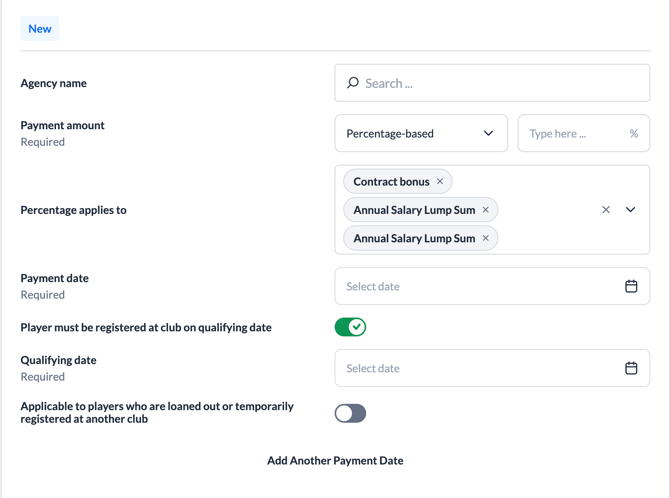
1.1. Payment Types (How is the amount defined?)
An agency fee can be set up in two primary ways:
-
Fixed Amount: A simple, guaranteed lump sum (e.g., £50,000).
-
Percentage-based: The agency receives a percentage of the player's earnings.
-
The "Percentage Applies To" Setting: This is a crucial feature. The user can select specific "Payment Targets." For example, the agent might get 5% of the player's Base Salary and Match Bonuses, but 0% of their Sign-on Fee.
-
1.2. The "Qualifying Date" (Eligibility)
Just like player bonuses, agency fees can be protected by a Qualifying Date.
-
The Rule: "The agent is paid £10,000 on August 1st, but only if the player is still registered with the club on July 1st."
-
The Logic: The system automatically checks the player's official registration. If the player is sold or their contract is terminated before the qualifying date, the system automatically cancels the upcoming payment.
1.3. Payment Schedules
Large agency fees are often split into multiple installments.
-
The Logic: A £100,000 fee might be paid in four equal installments of £25,000 over two years.
-
The Check: Each installment has its own specific Due Date and Amount.
1.4. Handling Loans (Include Loaned Players)
The user can toggle a setting called "Include Loaned or Temp Players."
-
The Logic: Determines if the club still owes the agent their fee if the player goes out on loan.
-
Result: If turned OFF, the system pauses or cancels agency payments while the player is away, as they are no longer "Active" for the parent club.
1.5. "Likelihood" and Forecasting
For fees based on percentages of performance bonuses, the system uses Likelihood Events.
-
The Logic: The system "forecasts" the agency fee based on current performance trends (e.g., scoring rate).
-
The Result: This provides the finance team with a "Likely to be Triggered" amount, which is invaluable for budget planning.
2. Contract Extensions
In professional football, Contract Extensions are used to keep a player at the club longer than originally agreed. ContingencyAI automates the tracking of these "options" to ensure deadlines are not missed.
2.1. The Two Types of Extensions
The system handles extensions in two distinct ways:
A. Manual Option (The "Club's Choice")
-
The Logic: "The club has an option to extend the contract for one more year."
-
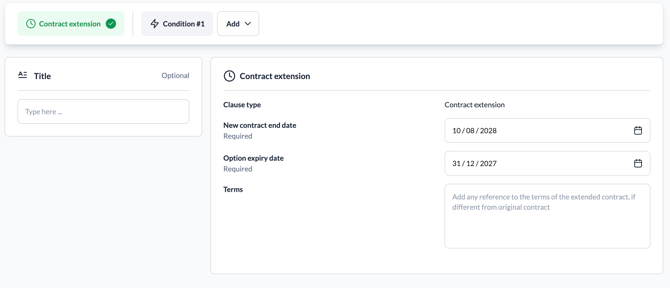
How it works: This is a Choice. The user defines an Option Expiry Date.
-
The Result: The system sends a notification (e.g., 30 days before expiry), asking the club if they want to "Trigger" the extension manually.
B. Automatic Option (The "Purchase Obligation")
-
The Logic: "The player's contract must be extended if they play 30 games."
-
How it works: This is a Triggered Event. The system monitors player data automatically.
-
The Result: As soon as the player hits the defined milestone (e.g., 30th start), the system triggers the extension and updates the contract status.
2.2. What happens when it triggers?
When an extension is triggered (manually or automatically):
-
New Contract End Date: The player's Contract End Date is automatically updated (e.g., from June 2026 to June 2027).
-
Terms: The user can specify new terms, as salaries or bonuses often change during extension years.
-
Active Monitoring: The system continues to track all performance bonuses through the new, longer contract period.
2.3. Contract Extension Monitoring
The dashboard (Contracts tab) provides specific columns to track the player's future:
-
Extension Option: Displays the type of extension available.
-
Option Expiry: Shows the deadline date for the decision.
-
Expiring Soon: Automatically highlights contracts where the Option Expiry Date is approaching.
-
Contract Expiry: Shows the current official end date of the agreement.
3. Salary Adjustments
Salary Adjustments manage changes to a player's base pay, commonly used for "Promotion Rises" or "Relegation Cuts."
3.1. The Three Types of Adjustments
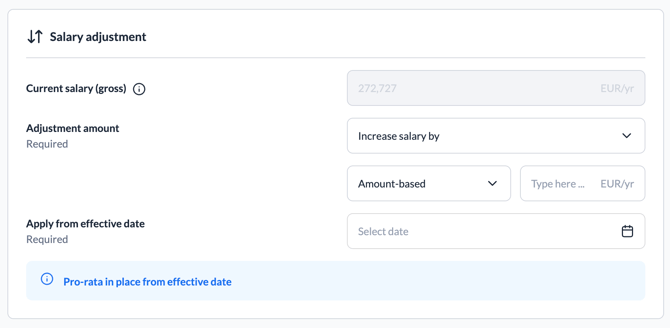
When triggered, an adjustment modifies the Base Salary in one of three ways:
-
Increase: Adds a specific value (e.g., +£5,000/week).
-
Decrease: Subtracts a specific value (e.g., -£10,000/week).
-
Change To: Replaces the old salary with a new fixed amount (e.g., "Exactly £30,000/week").
3.2. Amount vs. Percentage
-
Amount-Based: A fixed currency value (e.g., "Increase by £2,000").
-
Percentage-Based: A relative change (e.g., "Decrease by 25% due to relegation"). The system automatically calculates the new gross amount.
3.3. The Effective Date
Every adjustment has an Effective Date.
-
The Logic: This is the date the new pay rate officially "kicks in."
-
System Action: If promotion is confirmed in May but the new salary starts July 1st, the system respects this date to ensure monthly payroll remains accurate.
3.4. Impact on the Whole Contract
An adjustment changes the salary for the entire remaining contract lifecycle:
-
Automatic Recalculation: Agency Fees calculated as a percentage of base salary are automatically updated to reflect the adjusted rate.
-
Forecast Updates: The club's financial 12–24 month forecast immediately updates to show the accurate total cost of the player.