
1. Minimum and Maximum Liability
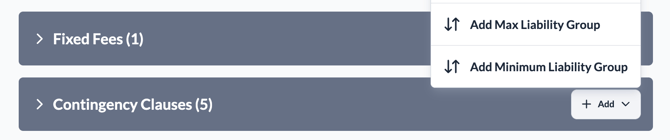
1.1. Maximum Liability (The "Financial Cap")
This is a ceiling. It ensures that the buying club will never pay more than a specific total amount, no matter how many goals the player scores or how many trophies the team wins.
-
How it works: The system keeps a "Running Total" of every fee triggered for that specific contract.
-
The Logic: Before the system triggers a new payment (like an appearance bonus), it checks: Total Paid So Far + New Payment = Is it more than the Cap?
-
The Result: * If the new payment would push the total over the cap, the system automatically reduces the payment so it perfectly hits the cap, then stops all future triggers.
-
If the cap is already reached, the system will still "detect" the milestone (e.g., "Player reached 50 games"), but it will trigger a fee of £0 and mark it as "Over Financial Cap."
-
Support Tip: If a club asks why an appearance bonus triggered as £0 or a smaller amount than expected, check the Financial Cap in their Ruleset. This and the prorata are the most common reason for "partial" payments.
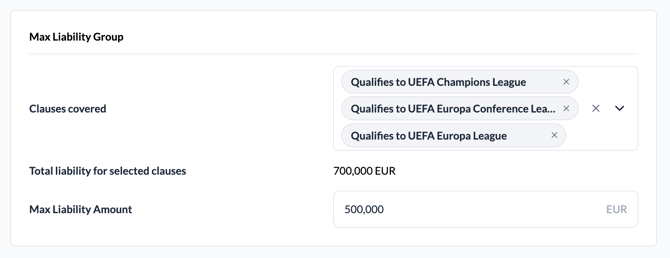
1.2. Minimum Liability (The "Guaranteed Floor")
This is a floor. It ensures that the selling club receives a minimum total amount by a specific date, regardless of whether the player actually met their performance goals.
-
How it works: It acts as a "Safety Net" for the selling club.
-
The Logic: On a specific date defined in the contract, the system looks at:
-
How much has been paid in Fixed Fees (guaranteed money).
-
How much has been paid in Contingency Fees (bonuses for goals, appearances, etc.).
-
-
The Result:
-
If the total of (Fixed + Bonuses) is less than the Minimum Liability, the system automatically triggers a "Top-up" payment to make up the difference.
-
Example: If the Minimum Liability is £2 million by July 2026, but the player only triggered £1.5 million in total fees by that date, the system will automatically trigger a final £500,000 payment on that day.
-
Support Tip: Minimum Liability payments usually trigger on player departure from the club. If a club sees a sudden "Adjustment" or "Top-up" payment they weren't expecting, it’s usually because the "Minimum Liability" hadn't triggered enough performance bonuses until the date.
2. Manually Tracked Clauses
A Manually Tracked Clause is used for contractual conditions that the system cannot track automatically using match data.
While ContingencyAI is great at counting goals and appearances and identifying performance milestones, some clauses are based on unique events that require a human to "tell" the system they happened.
2.1. What kind of clauses are manually tracked?
Any condition that isn't based on standard performance data. Common examples include:
-
Player Awards: "Pay £50,000 if the player wins 'Player of the Month' or is named in the 'Team of the Year'."
-
Conduct Bonuses: "Pay £20,000 if the player has no disciplinary issues for 2 seasons."
-
Legal/Contractual Events: Right of Future Transfer Refusal, No-Join Indemnity, or Purchase Option Subject to Medical.
2.2. How does the logic work?
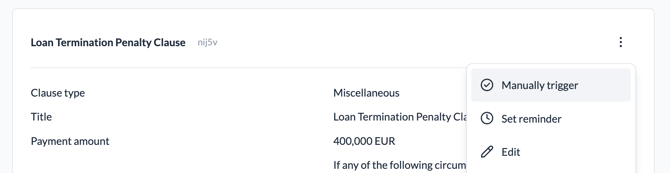
Because the system doesn't have a "Team of the Year" data feed, it uses a Reminder & Manual Trigger workflow:
A. The Reminder When the contract is set up, a support representative or club user can set a Reminder Date.
-
The system will send a notification on that date (e.g., at the end of the season) to prompt the user to check if the condition was met.
B. The Manual Trigger If the condition was met, the user must manually "Trigger" the fee in the platform.
-
The user enters the Trigger Date (when the event happened) and the Final Amount.
-
The System Action: Once triggered, the system treats it exactly like an automated fee; it creates a Triggered Event and notifies accordingly.
C. Verification & Flagging Because these are entered manually, the system includes extra safety features:
-
Is Flagged: Users are able to "Flag" a manual fee if it looks incorrect or needs further documentation.
-
Manual Overrides: The system allows for "Untriggering" a fee if it was entered in error, which will automatically clean up any related payments in the sell-on chain.