
Dashboard
The Dashboard serves as your landing page, providing an overview of transfer contract payment data for players you have sold or loaned out (Transfers Out) or players you have purchased or loaned (Transfers In).
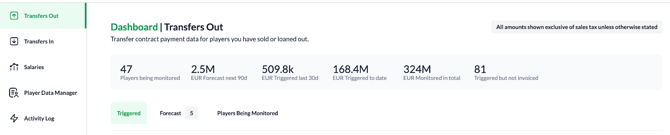
At the top of the page, you can view your financial totals, including amounts already triggered, forecasted payments, and the total monitored value. You can navigate between three specialized tabs: Triggered, Forecast, and Players Being Monitored.
Key Metrics
-
Players being monitored: Total number of players currently tracked under "Transfers Out" contracts.
-
Forecast next 90d: Projected total value of payments expected to trigger within the upcoming 90 days.
-
Triggered last 30d: Cumulative fees officially triggered by performance or milestones over the past 30 days.
-
Triggered to date: Total historical value of all triggered payments for the current category.
-
Monitored in total: Combined potential value of every active contract currently being tracked.
-
Triggered but not invoiced: Count of individual clauses that have met conditions but are not yet marked as invoiced.
Currency Support
The platform supports 38 global currencies (e.g., EUR, GBP, USD, BRL, SAR, TRY).
-
Contract Level: You select the currency that matches the legal agreement when adding a player. All payouts in the Clause Builder will use this currency.
-
Dashboard Level: For high-level reporting, all currencies are automatically converted into one of the main platform currencies: EUR, USD, or GBP.
Specialized Tabs
Triggered Tab
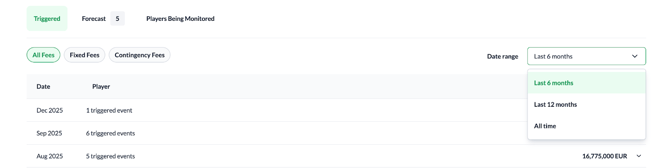
View a list of all triggered clauses within a specified timeframe (e.g., last 6 months, 12 months, or all time).
-
Filters: Narrow your view by clause type (Fixed Fees vs. Contingency Fees).
-
Monthly Organization: Expand a month to view individual items and perform actions like marking as invoiced, adding sell-on contracts, or viewing match history.
Forecast Tab
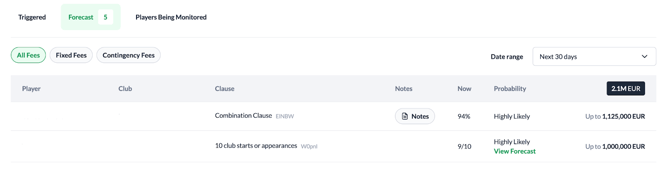
Track the progress of active clauses toward their trigger points.
-
Probability Monitoring: Monitor the likelihood of events occurring, categorized as Likely, Highly Likely, or Certain.
-
Timeframes: Adjust your view to see projections for the next 30, 60, or 90 days.
Players Being Monitored
A detailed registry of every player whose contract contains financial triggers or ongoing payment obligations, separated into Transfers Out

and Transfers In

Player Pop-up & Clause History
Clicking any player in the monitored list opens the Player Pop-up, featuring:
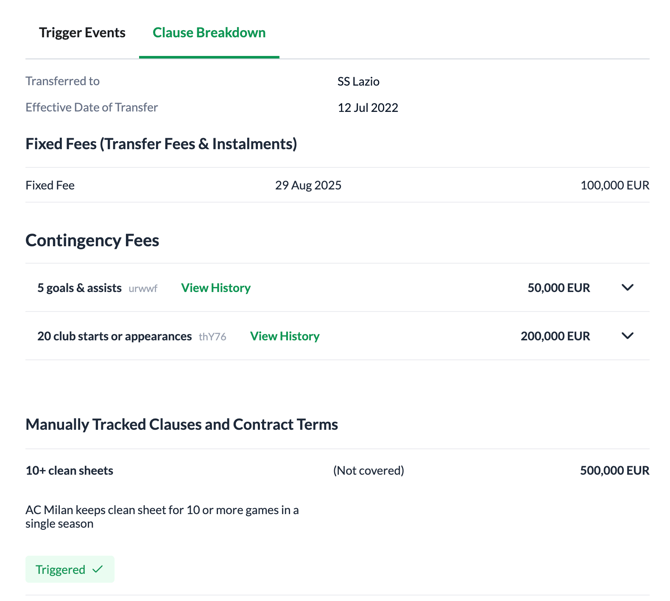
A. Trigger Events: Forecasts upcoming milestones and tracks invoicing status.
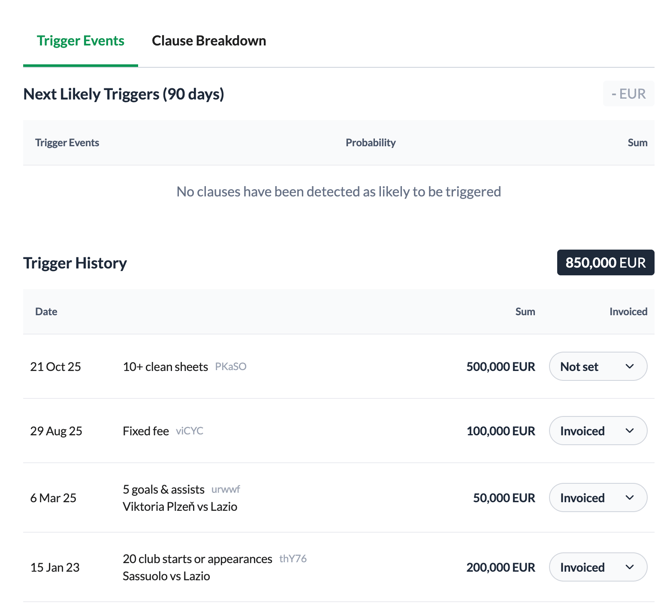
B. Clause Breakdown: Details every specific clause set for that player.
Clause history and forecasting
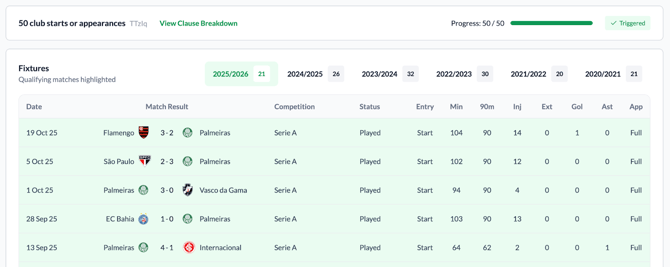
When you click View History on a triggered appearance clause, you can access a comprehensive log of every match that contributed to that milestone.
You can review a chronological list of fixtures where qualifying matches are highlighted in green. For every match, you can verify specific data points including the competition, minutes played, and individual stats like goals or assists and whether the player started or entered as a substitute. Additionally, you can toggle between seasons to track this historical data across the player’s entire contract.
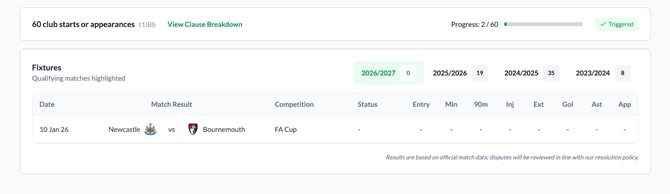
If a clause is still active, you can click on View Forecast view to see the player’s path to achieving the target by:
-
monitoring a real-time progress bar showing how many more units (such as starts or appearances) the player needs to trigger the next payment
-
checking the team's future schedule to identify which upcoming matches provide the player with an opportunity to reach their contractual milestones.
Invoicing
Invoicing lets you track where every triggered clause sits in your billing cycle, from the moment it triggers to the moment the money moves. Instead of a simple invoiced / not invoiced flag, each triggered event carries a status that you move through four steps, and the dashboard totals update as you go.
Invoicing applies to every triggered event on a transfer contract - contingency clauses, fixed fees, other fees, or sell-on payments.
The four statuses
The statuses you see depend on the direction of the contract, because in Transfers Out you are the one being paid, and in Transfers In you are the one paying.
| Step | Transfers Out (you are owed money) | Transfers In (you owe money) |
|---|---|---|
| 1 | Ready For Review | Ready For Review |
| 2 | Ready To Invoice | Awaiting Invoice |
| 3 | Invoice Sent | Invoice Received |
| 4 | Payment Received | Payment Sent |
Every clause starts life as Ready For Review as soon as it triggers. You are not forced to move through the steps in order - you can set any of the four statuses at any point, so a payment that arrives without an invoice can be marked straight as received.
Where you update a status
You can change a status in two places:
- The Triggered tab on the Dashboard. Expand a month, and each triggered event shows a status chip in the Status column. Click the chip to pick a new status.
- The Player Pop-up, in the Trigger Events tab, using the same chip against each event in that player's history.
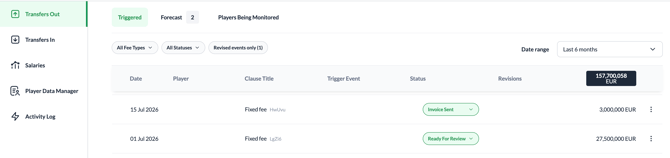
The status control only appears on events that carry a value. Clauses that trigger for a zero amount have nothing to invoice, so no chip is shown.
Filtering by status
At the top of the Triggered tab you can filter the feed by status. The filter offers All Statuses plus the four statuses that apply to the contract direction you are viewing, and works alongside the existing Date range and Fee type (All Fee Types / Fixed Fees / Contingency Fees).
How the dashboard totals are built
The tiles at the top of the Dashboard are driven directly by these statuses. Each tile shows a count of clauses and, where there is a value, the summed amount converted to your club currency.
- Total triggered clauses: every clause that has triggered.
- Ready for review: clauses that have triggered but that nobody has looked at yet.
- Ready to invoice (Transfers Out) / Awaiting invoice (Transfers In): clauses that have been reviewed and are waiting on an invoice.
- Awaiting payment (Transfers Out) / Ready to pay (Transfers In): the invoice exists, the money has not moved.
- Paid: clauses marked as Payment Received or Payment Sent.
In the Players Being Monitored tab, each player shows a progress bar comparing the clauses already settled against the total number of triggered clauses for that player.
Revisions: what happens when a contract changes
Once you have moved a clause past Ready For Review, the system treats it as actioned - a figure you may already have billed on. If a later contract edit changes that clause's amount or trigger date, the system will not overwrite your record silently. Instead:
- The event is flagged as a revision, its row is highlighted, and it is tagged as Recalculated, Rescheduled, Restructured, or Removed.
- The status chip is locked, the syste waiting for you to acknowledge the changes first.
- You review the change and click Accept. The new figure becomes the confirmed value, and the chip unlocks.
Two refinements are worth knowing:
- If a clause is already marked as paid and only its date changes, the change is applied without raising a revision.
- If a clause's status has not been touched for more than a year, it is treated as settled history and is no longer checked for revisions.
Audit trail
Every status change is recorded. You can open Triggered event logs from the row menu on any triggered event to see the full status trail - each entry showing what the status was changed to, when, and by whom. System-generated entries are attributed to CAI System. The same changes are also written to the platform-wide Activity Log, alongside contract edits and revision acknowledgements.
Clause Builder
The Clause Builder allows you to turn legal contracts into tracked digital logic across three configuration levels:
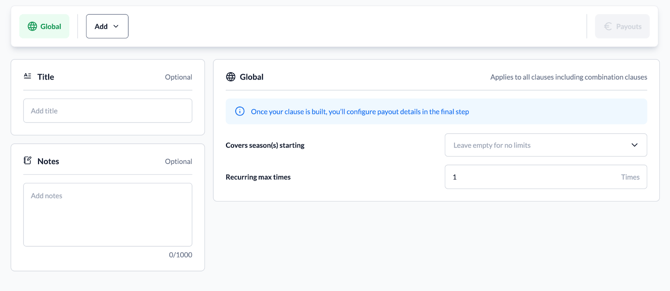
1. Global Settings
Define high-level parameters:
-
Seasons Covered: Select which years the agreement applies to.
-
Recurrence: Set how many times the clause is allowed to trigger.
-
Title & Notes: Add custom names and internal context for easier identification in reports.
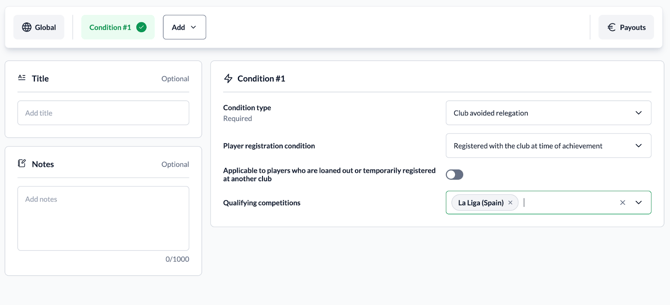
2. Condition Level
Add triggers (e.g., "Starts or Appearances," "Club Gains Promotion") and define specific requirements (number of units, teams, and competitions).
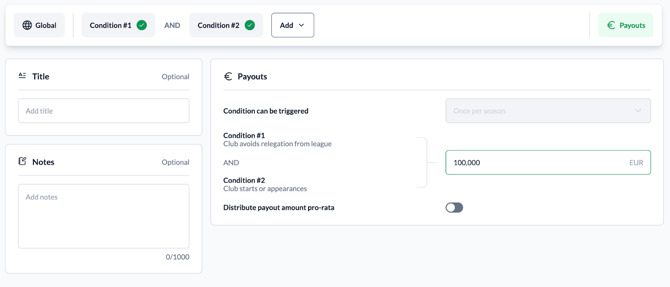
3. Payouts
Set the specific amount due. You can also specify if the payout triggers only at the final target or can be distributed pro-rata for partial achievement.
4. Logical Operators
To handle complex deals, use the following operators:
-
AND: Both requirements must be met (e.g., 20 appearances AND promotion).
-
OR: Either condition can trigger the payout. This allows for alternative paths or tiered incentives (e.g., €200k for 20 goals OR €100k for 10 goals).
-
Start Group: Create "nested" logic for complex chains (e.g., Condition A AND (Condition B OR Condition C)).